

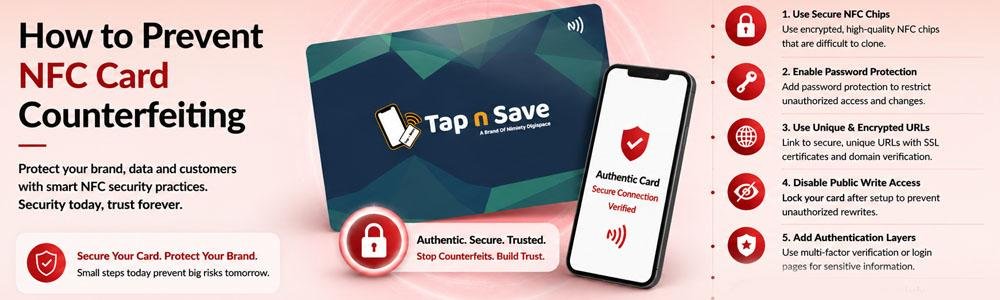
As NFC Business Cards become more popular, many businesses wonder whether someone could copy or counterfeit their card. While no physical product is completely immune to misuse, choosing the right NFC solution and following good security practices can significantly reduce the risk.
Modern NFC Business Cards are much more than just an NFC chip. They connect users to a secure digital profile, making it easier to maintain accurate business information while reducing the impact of copied physical cards.
Understanding how NFC cards work—and where potential risks exist—helps businesses make informed decisions and protect their brand.
📌 Quick Answer
You can reduce the risk of NFC card counterfeiting by purchasing from trusted suppliers, using secure digital profiles, avoiding unauthorized rewrites, and regularly checking that your NFC card links to the correct business information.
Can NFC Cards Be Counterfeited?
Like many physical products, NFC cards can potentially be copied if someone has physical access and the card's data is not protected.
However, copying an NFC chip does not automatically give someone control over your business profile or customer relationships.
How Tap n Save Helps Reduce the Risk
Tap n Save uses a digital profile approach rather than storing all your business information directly on the NFC chip.
This means your business information is managed through your online profile, allowing you to keep it updated without replacing the card.
🔒 Digital Profile Advantage
Your NFC card acts as a secure gateway to your Digital Visiting Card instead of storing large amounts of business information directly on the chip.
Best Practices to Prevent Counterfeiting
- Purchase NFC cards from trusted manufacturers.
- Regularly verify that your card opens the correct profile.
- Keep your account credentials secure.
- Avoid sharing administrative access unnecessarily.
- Replace damaged or suspicious cards if required.
Why Digital Profiles Offer Better Protection
🔄 Easy Updates
Keep your information current without replacing the card.
📱 Centralized Information
Manage your profile from one place.
🌐 Consistent Branding
Customers always see your latest business details.
⚡ Quick Verification
Easily confirm that your card directs to the correct profile.
Real Business Example
Imagine a consultant updates their office address and phone number after relocating.
Instead of replacing hundreds of printed business cards, they simply update their Tap n Save Digital Visiting Card. Every future tap automatically opens the latest information, helping maintain consistency for clients.
Why Businesses Trust Tap n Save
- Premium NFC Business Cards
- Digital Visiting Card included
- Unlimited profile updates
- NFC + QR compatibility
- Works on Android and iPhone
- Lead tracking and profile insights
Learn more about our NFC Business Cards and how they simplify secure digital networking.
🎯 Key Takeaways
- Choose NFC cards from trusted providers.
- Use digital profiles instead of static information whenever possible.
- Review your linked profile regularly.
- Keep your account credentials secure.
Frequently Asked Questions
- Can NFC Business Cards be copied?
Some NFC chips can potentially be copied, but using a managed digital profile helps reduce practical risks. - Does copying an NFC card copy my entire business profile?
No. Your online profile remains separate from the physical card. - How can I reduce the risk of counterfeiting?
Buy from trusted suppliers, verify your card regularly, and secure your account credentials. - Can I update my Digital Visiting Card if my details change?
Yes. Tap n Save allows unlimited profile updates. - Do Tap n Save cards work with Android and iPhone?
Yes. They support most modern smartphones and also include QR code compatibility.
Choose a Trusted NFC Business Card Solution
Build confidence with Tap n Save NFC Business Cards, designed to provide a reliable and professional digital networking experience.
Explore Business Cards →